All-in-One
vs.
Modular POS:
Define Your Architecture.
Hardware design dictates operational efficiency. Compare the sleek integration of All-in-One terminals with the extreme flexibility of Modular POS boxes to optimize your retail space.
Explore Hardware Framework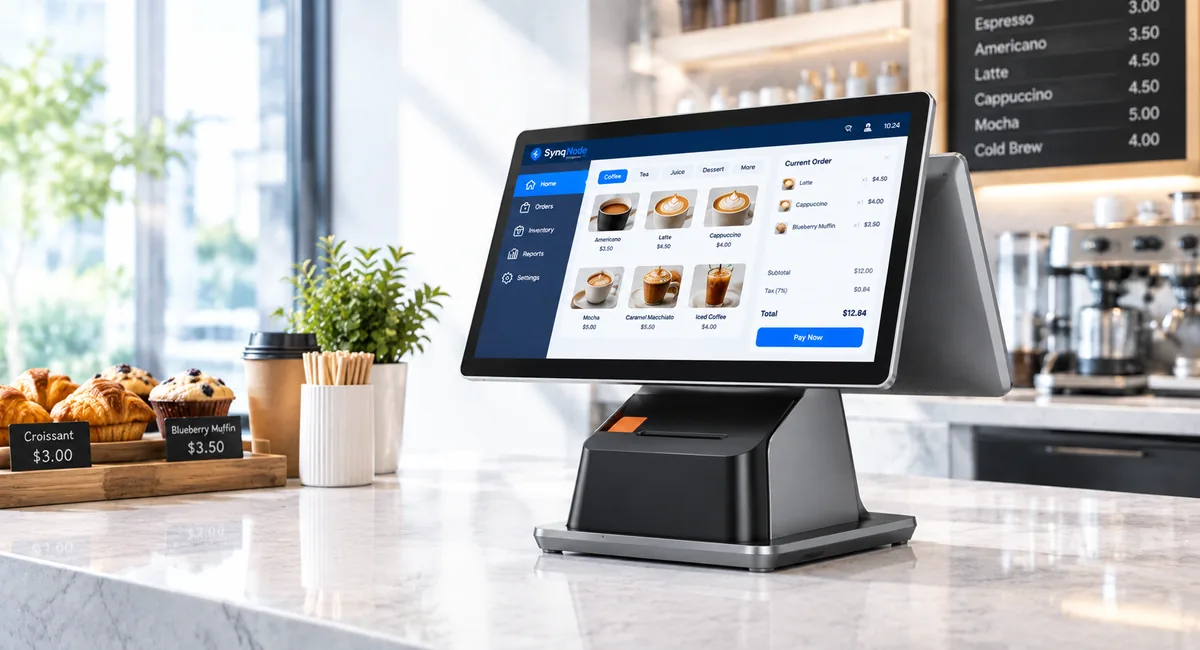
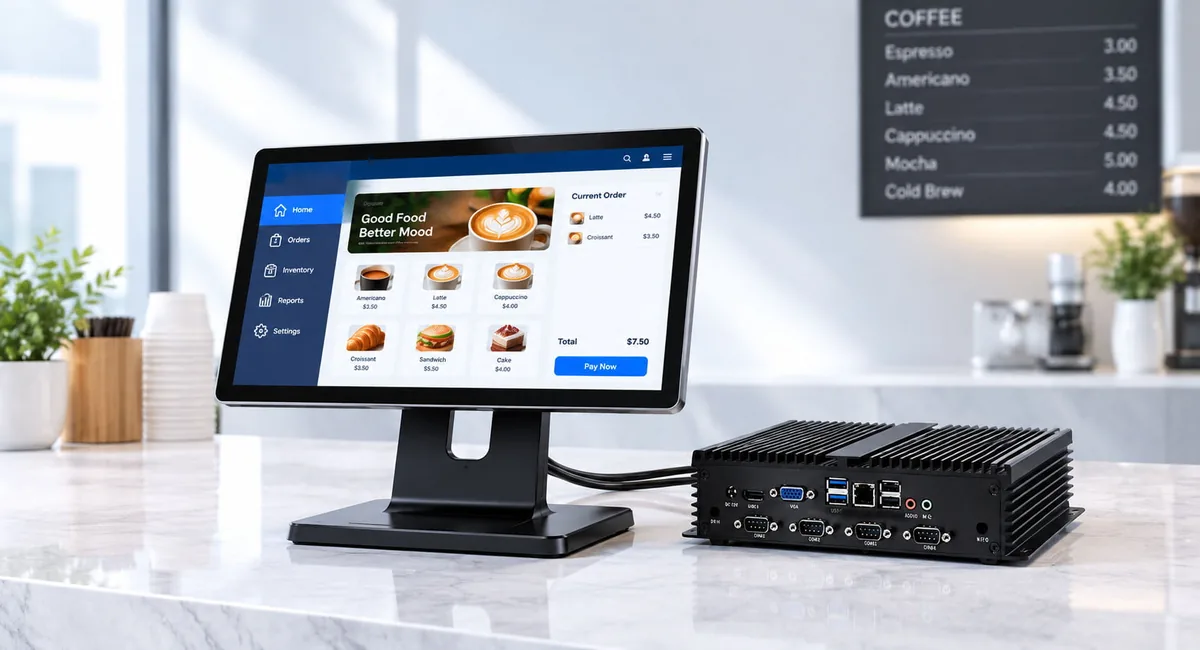
Which Architecture Should You Choose?
For most new store builds in 2025-2026, the decision ultimately comes down to transaction volume and maintenance strategy.
Choose AIO Terminals if...
Counter space is limited, brand aesthetics matter, and your stores have consistent layouts. Stores processing fewer than 500 transactions per day per lane greatly benefit from AIO's plug-and-play simplicity and cable-free design.
Choose Modular POS if...
You need maximum flexibility, serviceability, and durability. High-volume locations (800+ transactions per lane per day) are better served by Modular systems where monitors and PCs can be independently hot-swapped to prevent downtime.
When AIO Wins
Fashion & Boutique Retail
Premium stores prioritize clean, wire-free aesthetics. An AIO integrated screen-and-base sits elegantly on a glass counter. The checkout area looks like a designed element, not an IT installation.
Full-Service Restaurants
Counter ordering benefits from AIO's compact footprint. The terminal can easily mount on a pedestal without routing thick cables to a hidden PC box.
Space-Constrained C-Stores
Small-format retail with limited countertop depth simply cannot physically accommodate a separate monitor base plus a PC box beneath. AIO occupies the footprint of a single monitor.
Hospitality & Front Desks
Guest-facing check-in areas require a polished, highly professional appearance. AIO terminals present a unified, branded device that matches premium front desk design languages.
When Modular Wins
High-Volume Supermarkets
Processing 800+ transactions a day requires extreme durability. Modular PC boxes are mounted safely under the counter. If a customer damages the screen, it is replaced independently without swapping the computing unit.
Spill & Heavy Dust Environments
Deli counters and garden centers expose hardware to water and debris. Modular isolates the PC safely, while only the rugged monitor faces the harsh elements. Replacing a $300 monitor is cheaper than a $900 AIO.
Multi-Lane Rapid Repair
A 20-lane supermarket cannot afford 30 min of downtime. Modular allows hot-swapping: a failed monitor is replaced in under 2 minutes. The PC stays in place, preserving OS and software state.
Custom Peripheral Configurations
Stores needing dual monitors (operator + customer), specialized scales, or massive printer hubs benefit from Modular's expandable PC I/O. AIO terminals have fixed ports that cannot adapt to complex needs.
Different Forms.
Same Industrial Reliability.
The exterior form factor is dictated by your counter space, but the internal quality is never compromised.
At TillNode, both our All-in-One terminals and Modular POS boxes are powered by enterprise-grade processors and engineered with fanless cooling systems. 24/7 continuous operation is ensured across your entire network.
- Intel® / Rockchip ARM Platform
- 100% Fanless Heat Dissipation
- Aluminum Die-Casting Structure
Specs & 5-Year Maintenance Cost
Why modularity dominates high-volume environments.
Feature-by-Feature Detailed Comparison
| Feature | All-in-One POS | Modular POS Box |
|---|---|---|
| Footprint | Compact, single unit | Separate monitor + PC box |
| Cable Management | Zero visible cables | Requires physical cable routing |
| Installation | Plug-and-play (~15 min) | Professional install (~45 min) |
| Monitor Options | Fixed size and angle | Any size, fully adjustable arms |
| Repair Model | Entire unit shipped for service | Component-level independent swap |
| Downtime on Failure | 30+ min (requires full OS setup) | Under 2 min (monitor unplug/replug) |
| Peripheral Expansion | Fixed ports (Limited) | Full I/O panel + PCIe expansion |
| Durability Rating | Standard Retail | Industrial-grade (IP54+ options) |
| Unit Cost Avg. | $500 - $1,200 | $400-$800 (box) + Monitor |
5-Year Total Cost of Ownership
Scenario: A standard 10-lane retail store. Over 5 years, screens are the most frequently damaged component in high-volume retail.
| Cost Line (Hardware Lifecycle) | All-in-One POS (10 units) | Modular POS (10 systems) |
|---|---|---|
| Initial Hardware Cost | $8,000 ($800/unit) | $9,000 ($600 PC + $300 Monitor) |
| Year 2-3 Damages (2 Screens) | $2,000 (2 complete units serviced) | $600 (2 monitors swapped) |
| Year 4-5 Lifecycle Replacements | $4,000 (2 units totally replaced) | $900 (2 monitors + 1 PC box) |
| 5-Year TCO Total | $14,000 Effective: $1,400 / lane | $10,500 Effective: $1,050 / lane |
The Takeaway: Modular systems cost slightly more upfront but save significantly over 5 years. Monitor failures are the most common POS issue. Fixing a modular system costs $300 (a new monitor) vs $800+ for shipping/repairing a full AIO unit. Crucially, each minute of checkout lane closure during peak hours represents $50-$200 in lost revenue — Modular's 2-minute hot-swap preserves revenue.
Retailers in Action
How specific retail sectors align aesthetics with operations.
Luxury Fashion Chain
A European fashion brand prioritizing visual aesthetics. Every element from lighting to counter materials was dictated by architects.
Regional Supermarket
After years of replacing entire AIO units because of cracked screens in a punishing 1,000+ transaction/day environment, they switched to Modular.
Food Truck & Pop-Ups
A highly mobile vendor needing POS systems that could be set up and torn down rapidly every single day across different venues.
Software & Hardware Integration
Both AIO and Modular POS systems run identical OS (Windows 10 IoT, Android, or Linux) and support identical software. Integration differences are purely physical.
Peripheral Connectivity
AIO terminals typically include 4-6 USB ports, 1 RS-232, and 1 RJ45 — these are fixed on the motherboard and non-expandable.
Modular PC Boxes offer massive I/O flexibility: 6-8 USB, 2-4 RS-232, 2 LAN ports, plus PCIe expansion slots for specialized scale cards. Perfect for complex checkout stations needing scanners, cash drawers, scales, and receipt printers simultaneously.
Mounting & Physical Setup
AIO terminals sit on predefined counter stands. They are entirely pre-assembled out of the box.
Modular systems require heavy-duty monitor arms (VESA) and under-counter steel mounting brackets for the PC box. Professional installation is highly recommended for the first deployment to route cables. Afterward, component swaps are entirely tool-less.
Frequently Asked Questions
Can an AIO terminal actually be repaired, or must it be thrown away?
Can a Modular POS system look as clean as an AIO?
Which is better for a single-store mom & pop business?
Can I mix AIO and Modular systems across different store locations?
POS Decision Framework
The checklist to finalize your physical hardware topology. For the operator side of the same decision, see touch screen POS versus tablet POS, or browse the full comparison index.
Choose All-in-One POS if:
- ✔ Counter space is highly limited (<40cm depth)
- ✔ Brand aesthetics & cable-free appearance are critical
- ✔ Transaction volume is under 500/lane/day
- ✔ You have fewer than 5 lanes per store
- ✔ Rapid plug-and-play installation is required
Choose Modular POS box if:
- ✔ Transaction volume exceeds 800/lane/day
- ✔ Environment risks involve liquid spills or impact
- ✔ You operate 10+ lanes across locations
- ✔ You demand <2 min rapid downtime recovery
- ✔ Extremely complex peripheral I/O configurations
Request Hardware Specifics
Connect with OEM engineering for a tailored deployment quote.