Restaurant & QSR Solutions for
Faster Ordering and Connected Service.
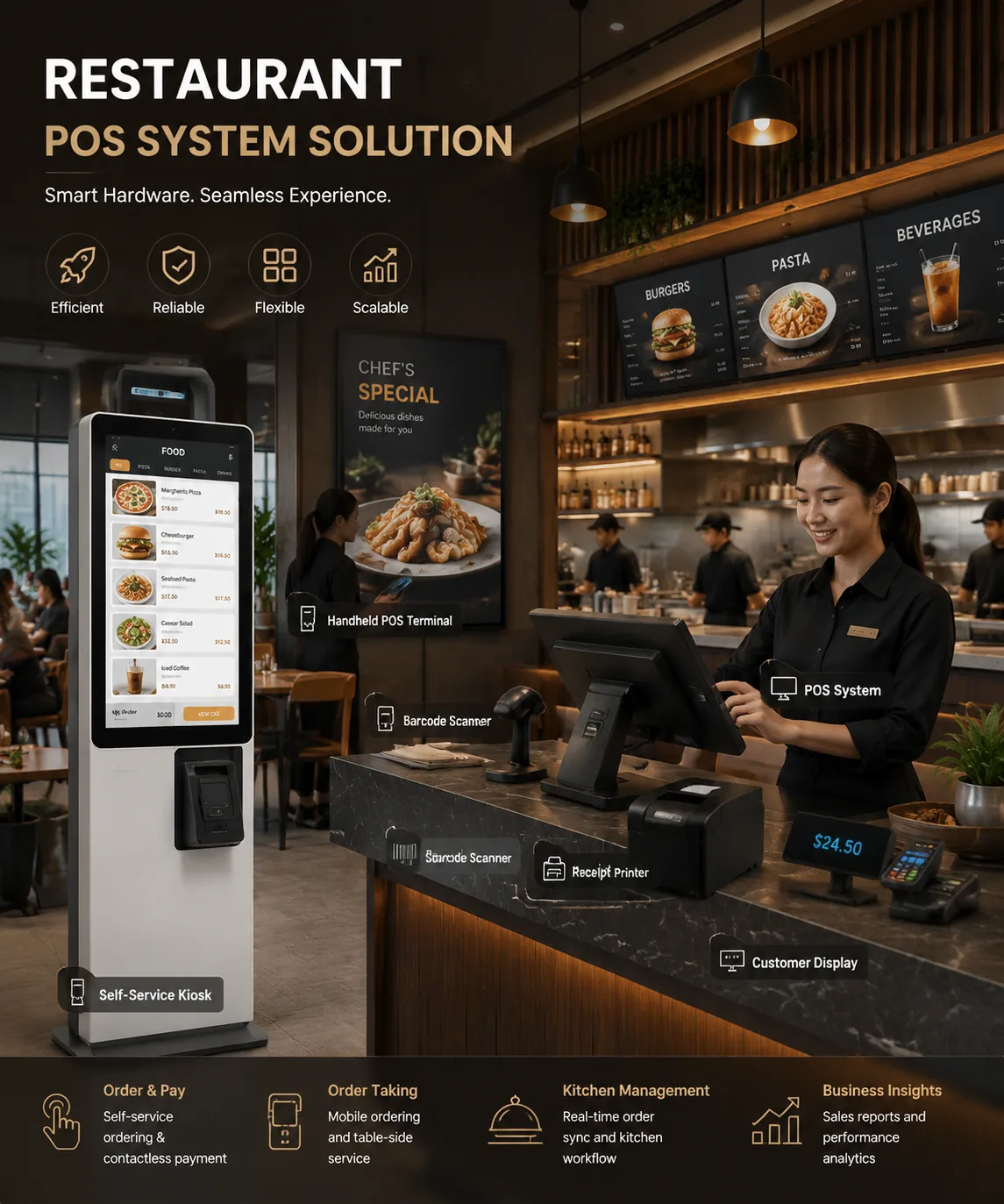
Restaurant operations are accelerated by our connected hardware ecosystem. Touch screen POS systems, self-service kiosks, ordering terminals, POS printers, kitchen printers, barcode scanners, Mini PCs, and peripherals are configured to support faster ordering, smoother checkout, and scalable QSR operations.
Order #4092 Ready
Kitchen to Front Sync: 0.2s
Restaurant Service Moves Fast.
Disconnected Hardware Slows It Down.
QSR and restaurant teams must manage orders, checkout, kitchen printing, pickup, and peak-hour traffic at the same time. When hardware is unstable or disconnected, service speed is reduced and customer experience is affected.
Long Queues During Peak Hours
Customers wait longer when only cashier-based ordering is available. Order flow is slowed down.
Slow Ordering and Checkout
Outdated POS hardware can limit staff speed, payment flow, and order accuracy.
Disconnected Kitchen Printing
Orders can be delayed when kitchen printers, POS terminals, and order systems are not connected properly.
Mixed Order Channels
Dine-in, takeaway, delivery, and self-ordering workflows must be handled without confusion.
Unstable Store Devices
Generic hardware is not always built for high-frequency restaurant operations and long service hours.
Difficult Chain Rollout
Multi-location restaurant brands need consistent hardware models, configurations, and support.
A Connected Hardware Layer Is Built for Restaurant Operations.
We connect restaurant software with physical service points. Ordering, checkout, kitchen printing, customer display, and self-service workflows can be supported through one reliable hardware ecosystem.
Ordering Nodes
Self-service kiosks and ordering terminals are deployed to help customers place orders faster.
Checkout Nodes
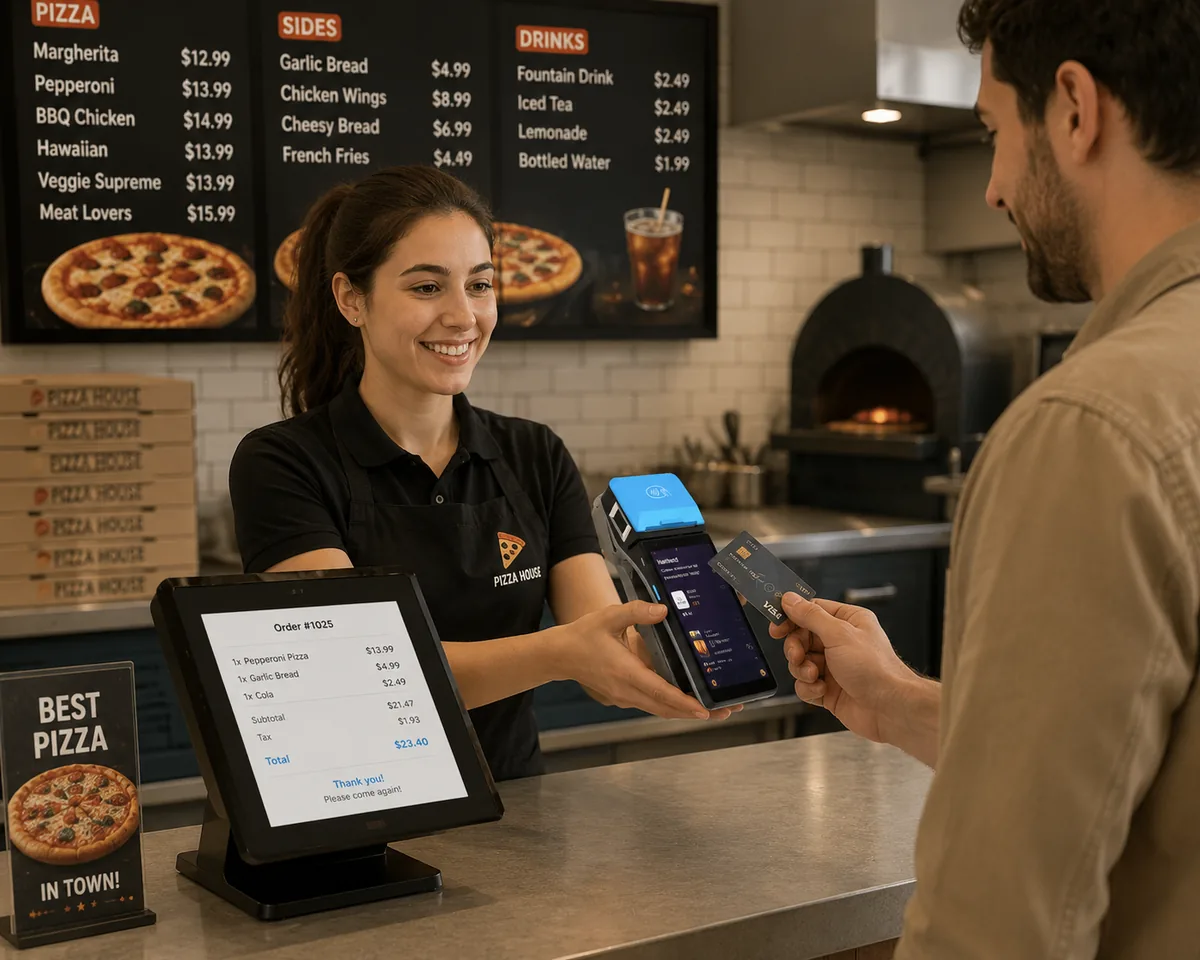
Touch screen POS systems, scanners, customer displays, and peripherals are used for cashier checkout and payment-ready workflows.
Kitchen Nodes
POS printers and kitchen printers are connected to send orders clearly to food preparation areas.
Display Nodes
Customer displays and digital signage can be used for order information, menu promotion, and pickup guidance.
Computing Nodes
Mini PCs and embedded computing hardware can be configured to support restaurant software and connected device control.
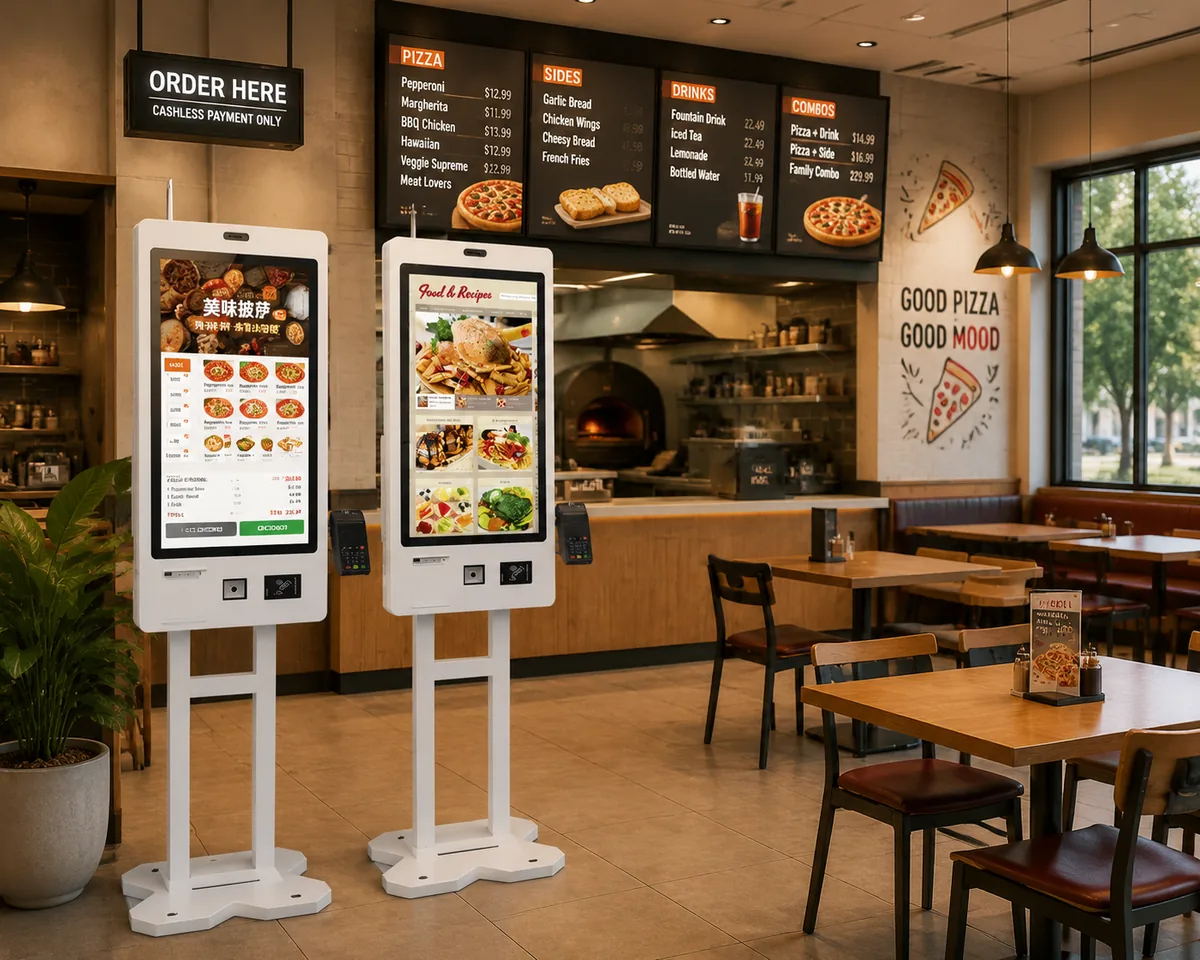
Queues Are Reduced with Self-Service Ordering Kiosks.
Self-service kiosks can be deployed to expand ordering capacity without adding more cashier counters. Customers can browse menus, place orders, select add-ons, and complete checkout with a smoother experience.
Faster Order Entry
Customers can place orders directly on self-ordering kiosks. Staff workload can be reduced during peak hours.
Better Upsell Opportunities
Combo meals, add-ons, limited offers, and promotions can be displayed clearly on ordering screens.
Consistent Customer Experience
The same ordering interface can be deployed across multiple restaurant locations.
Flexible Hardware Configuration
Kiosks can be configured with touch screens, printers, scanners, payment device holders, and custom branding.
Checkout Is Supported by Stable Restaurant POS Hardware.
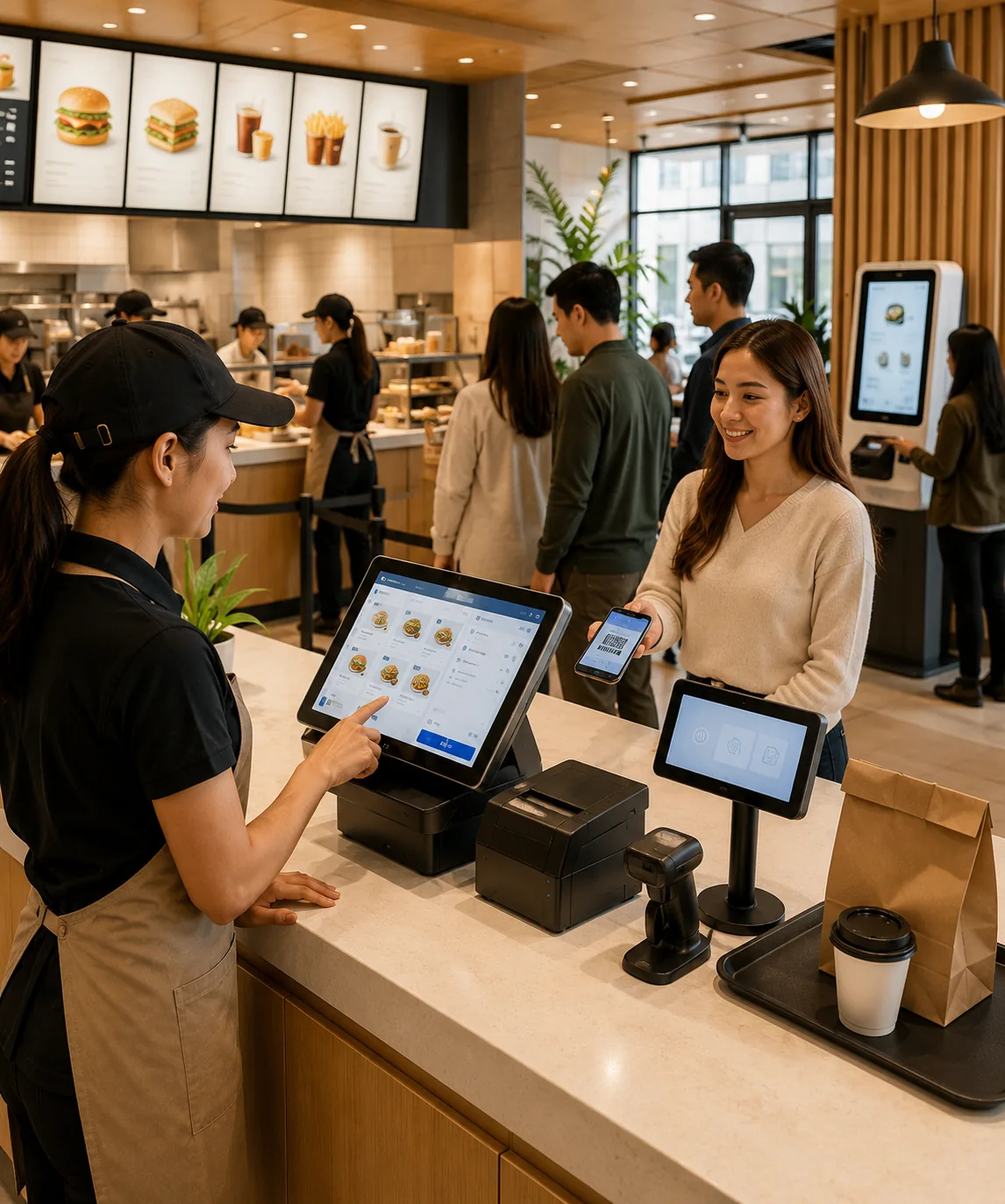
Fast food restaurants, cafes, and takeaway counters need reliable POS terminals and connected peripherals. Our restaurant POS hardware can be configured for cashier ordering, QR code scanning, receipt printing, customer display, and software operation.
Touch Screen POS Terminals
Android POS and Windows POS terminals are provided for restaurant checkout, order entry, and POS software operation.
QR Code and Barcode Scanning
1D and 2D scanners are used for coupons, loyalty codes, product codes, QR payments, and pickup verification.
Customer Display Integration
Customer-facing displays can be connected to show order details, prices, promotions, and payment information.
Peripheral Compatibility
POS printers, cash drawers, scanners, and payment accessories can be matched with store checkout workflows.
Kitchen Orders Are Sent Faster and More Clearly.
Orders from cashier POS systems or self-service kiosks can be routed to printing devices for kitchen preparation. Clear order tickets help restaurant teams reduce confusion and improve service speed.
Orders Are Placed
Orders can be entered through cashier POS terminals, ordering kiosks, or connected restaurant systems.
Orders Are Routed
Order data can be sent to the correct preparation area based on restaurant workflow.
Kitchen Tickets Are Printed
Kitchen printers and order printers are used to print clear tickets for food preparation teams.
Pickup Is Managed
Customer displays or digital signage can be used to guide pickup and reduce counter confusion.
Data Is Synchronized
Order, payment, and device data can be connected to POS software or cloud management platforms.
Recommended Hardware Kits for Restaurant and QSR Projects.
Different restaurant formats require different hardware combinations. Flexible hardware kits can be prepared based on your store layout, software platform, and service workflow.
Counter POS Kit
Cashier checkout, order entry, receipt printing, and customer-facing information can be supported by one stable hardware set.
Includes:
Touch Screen POS System / POS Printer / Barcode Scanner / Customer Display / Cash Drawer
Self-Service Ordering Kit
Ordering capacity can be expanded. Queues can be reduced. Customer self-service can be added to your restaurant workflow.
Includes:
Self-Service Kiosk / Touch Screen Ordering Terminal / Printer / Scanner / Payment Device Holder
Kitchen Printing Kit
Orders can be printed clearly for kitchen teams. Preparation speed and order accuracy can be improved.
Includes:
Kitchen Printer / POS Printer / Mini PC / Peripheral Accessories
Full QSR Hardware Kit
A complete restaurant hardware layer can be deployed for ordering, checkout, printing, pickup, and chain store operations.
Includes:
POS Systems / Self-Service Kiosks / Kitchen Printers / Scanners / Customer Displays / Mini PCs / Peripherals
What a Restaurant POS and Kiosk Setup Costs
Restaurant hardware budgets are set by format and by service model, not by brand. The bands below are 2026 single-site figures for hardware and software, excluding payment processing, and they reflect the configurations our own restaurant projects are built around.
Hardware budget by restaurant format
Counter-service and cafe
$800 – $2,000
hardware for the first station
One all-in-one till, an 80mm receipt printer, a cash drawer, a 2D barcode scanner and a customer display. Software usually adds $30 to $90 per station per month.
Fast-casual and QSR with self-ordering
$6,000 – $16,000
two kiosks plus counter and kitchen
Two self-ordering kiosks with integrated printer and payment module, one counter till for exceptions and cash, a kitchen display screen and a kitchen printer. This is the configuration that shortens the queue fastest.
Full-service restaurant
$2,500 – $6,000
two lanes and a kitchen screen
Two POS stations, two receipt printers, a handheld terminal for table service, one or two kitchen display screens with a bump bar, and customer-facing displays.
Multi-location chain
$4,000 – $12,000
per site, including spares
A standardized counter or QSR kit replicated site by site, plus a spare pool and a staged rollout. Per-site unit cost falls as order volume grows.
What each restaurant hardware component costs in 2026
Component
Entry / Mid-range
Commercial grade
All-in-one POS terminal, 15.6in
$250 – $900
$900 – $1,800
Dual-screen POS terminal
$380 – $1,100
$1,100 – $2,000
Receipt printer, 80mm thermal
$60 – $220
$220 – $400
Kitchen printer with buzzer alert
$80 – $350
$350 – $600
Cash drawer
$40 – $150
$150 – $300
Barcode scanner, 2D imager
$30 – $180
$180 – $400
Customer display
$60 – $250
$250 – $500
Kitchen display screen, 21.5in, IP54
$300 – $1,000
$1,000 – $1,500
Handheld ordering terminal
$120 – $450
$450 – $800
Self-ordering kiosk, 21.5in, printer and scanner
$900 – $3,200
$3,200 – $6,000
US street price bands, 2026. The top tier is not the largest screen; it is the unit that is still running in year five in a room full of heat, grease and flour.
Self-ordering kiosk cost by mounting type
Tablet or wall-mount
$1,500 – $3,500
per ordering station
A tablet in a locked stand is the cheapest entry point into self-ordering. Where order volume is low, a complete tablet kiosk package can be assembled from around $500 to $1,000.
Indoor freestanding
$3,000 – $8,000
per kiosk
Steel or aluminum enclosure, an ADA-reachable form factor, an integrated thermal printer and a payment module, usually quoted with delivery and commissioning.
QSR self-ordering with EMV
$4,500 – $9,500
per kiosk, payment certified
A certified EMV payment module, order-ready board integration and menu management, specified for the uptime a lunch peak demands.
Outdoor and IP65+
$5,000 – $15,000+
per kiosk
Sealed enclosure, sunlight-readable panel and a wide operating temperature range for drive-thru lanes, forecourts and curbside pickup points.
Kiosk software is normally billed per screen per month, commonly between $50 and $300, and installation and commissioning runs $300 to $1,500 per site. Expect 15% to 30% off unit hardware pricing once an order passes roughly ten units.
On returns: operators typically see kiosk payback in three to six months at high order volume and six to eighteen months at moderate volume. The main driver is average ticket uplift of 15% to 30% from prompted add-ons, not headcount reduction on its own.
For the full hardware, software and processing breakdown across a three-year horizon, read our guide to POS system costs. For the kitchen side, our kitchen display system guide covers what actually drives display pricing.
Hardware for Each Type of Restaurant
A coffee shop, a bakery and a forty-seat fast-casual unit do not need the same hardware. Below is the configuration we build most often for each format, and what each one changes about the rest of the setup.
Coffee shop and cafe
Queue time matters more than table management. A fast counter till, an 80mm receipt printer, a cash drawer and a customer display carry almost every transaction.
Hardware focus: till response speed, printer paper loading, drawer cycles
Cafe POS solutionsBakery
The counter has to weigh, price and label in one motion. Scale integration and a label printer for date and allergen tags matter as much as the till itself.
Hardware focus: scale integration, label printing, multi-item baskets
All-in-one POS terminalsFast-casual and QSR counter
Throughput is the whole design goal. Self-ordering kiosks absorb the queue, a kitchen display or kitchen printer routes the order, and one counter till handles cash and exceptions.
Hardware focus: kiosk uptime, kitchen routing, order-ready display
Ordering kiosksPizza and takeaway
Two printers, not one: a receipt printer at the counter and a large-format kitchen ticket at the pass. Multi-channel order intake is what strains the setup.
Hardware focus: multi-channel intake, ticket legibility, printer redundancy
POS printersFood truck
Space, power and connectivity are the constraints. A tablet or compact all-in-one, a mobile receipt printer and a reliable cellular link beat a full fixed lane.
Hardware focus: battery and 12V power, LTE connectivity, vibration tolerance
POS tabletsBar and pub
Tabs, transfers and split payments drive the specification more than throughput does. Two or three stations, a handheld for the floor and a drawer with high note capacity.
Hardware focus: tab handling, handheld range, drawer capacity
Hospitality solutionsDrive-Thru Lanes and Multi-Location Rollouts
Two deployments ask more of restaurant hardware than a single indoor counter: an outdoor drive-thru lane, and a rollout across several sites. Both are specification problems before they are software problems.
Drive-thru and outdoor ordering
A sealed, rated enclosure
IP65 or better with a wide operating temperature range, because the unit sits in weather, dust and exhaust rather than in a climate-controlled room.
A sunlight-readable panel
Brightness matters more than resolution outdoors. A standard indoor panel becomes unreadable at midday, which is exactly when the lane is busiest.
Confirmation screen and audio path
The order confirmation display and the speaker route are part of the ordering position, not an accessory added afterwards.
Serviceable from the lane side
Paper, power and the payment module should all be reachable from one side, so a jam costs a minute instead of closing the lane.
Rolling out hardware across multiple sites
1. Freeze the SKU list
One counter kit and one kiosk model across every site, so a spare from one location fits any other without a re-order.
2. Pilot at one store
Run a full service week at a single location before committing the chain, including a peak shift and a stock delivery day.
3. Template the configuration
Store layout, menu and printer routing saved as a template that each new site inherits, rather than rebuilt by hand.
4. Stage the rollout
Two to four sites per wave. Spreading installation keeps the support load inside the capacity of the team that has to answer the phone.
5. Hold a spare pool
Three to five percent of installed units as local spares, plus a documented RMA path with a named contact.
We wrote a separate piece on planning POS hardware for a franchise, and a working checklist for multi-store hardware rollouts.
Sourcing Restaurant Hardware at Volume
If you are an integrator, a software vendor, a distributor or a chain buying for several sites, you are not really shopping for a product. You are choosing a supply relationship, and the questions that matter are different: what changes at volume, how long production takes, and who carries the certification.
OEM or ODM: what changes
OEM
You choose the configuration and we manufacture to it. Enclosure, panel, printer, scanner and operating system are selected from a defined option set, and your logo and boot screen are applied. This is the fastest route to a branded, repeatable unit.
Typical starting volume: 10 to 50 units
ODM
The enclosure or the internals change for your project: custom form factors, mounting geometry, port layout and board-level options. This needs tooling, a sample cycle and a higher minimum order quantity.
Typical starting volume: 50 to 100 units
Indicative unit price at 1, 5, 20 and 100 units
1 unit
$450 – $700
sample or single-site evaluation
5 units
$410 – $640
pilot across a few sites
20 units
$370 – $580
regional rollout
100 units
$320 – $500
chain or distribution volume
Indicative USD unit price for a 21.5-inch self-ordering kiosk with thermal printer and 2D scanner, 2026. Configuration, payment module, certification and enclosure material move these bands. They are directional and not a quotation.
What to confirm before you place an order
Minimum order quantity
Standard models can ship from a single unit. Custom enclosure or ODM work typically starts at 50 to 100 units, and logo or color customization at 10 to 50.
Lead time
Stock models ship in 3 to 7 days, standard production runs 15 to 25 days, and ODM projects with new tooling run 30 to 45 days.
Certification
FCC, CE and RoHS are standard. Payment modules carry EMV and PCI PTS certification, and outdoor models are quoted together with their IP rating.
Accessibility and mounting
For US deployments, reach height and floor-space requirements should be fixed before the enclosure is ordered, not after it arrives.
Warranty and spare parts
Confirm the warranty term, the spare-parts window and whether touch panels and printers are field-replaceable by your own technician.
Documentation
Ask for the wiring diagram, mounting drawings and operating-system image policy up front, before the first purchase order is issued.
Our guide to OEM versus ODM POS manufacturing goes deeper on the engineering trade-offs, and how to test POS hardware before a bulk order covers the sample process.
Frequently Asked Questions
The questions we are asked most often by restaurant operators, integrators and chains planning a hardware purchase.
How much does a restaurant POS system cost in 2026?
A single-station counter-service setup runs $800 to $2,000 in hardware, a full-service restaurant with two stations and a kitchen display runs $2,500 to $6,000, and a fast-casual unit with two self-ordering kiosks runs $6,000 to $16,000. Software adds roughly $30 to $300 per station per month, and payment processing is charged separately on every card sale.
How much does a self-ordering kiosk cost for a restaurant?
An indoor freestanding self-ordering kiosk typically costs $3,000 to $8,000, a QSR kiosk with a certified EMV payment module costs $4,500 to $9,500, and an outdoor unit rated IP65 or better starts around $5,000. Software is usually billed per screen at $50 to $300 per month.
What hardware do I need for a QSR self-service ordering setup?
Two self-ordering kiosks with an integrated printer and scanner, one counter POS terminal for cash and exceptions, a kitchen display screen or kitchen printer to route the orders, and a customer-facing order confirmation screen. Cabling, mounting and network access are normally quoted together with the hardware.
Can a restaurant run on a tablet POS instead of a full terminal?
Yes, and for food trucks, pop-ups and small cafes it is often the right answer. A tablet setup costs less upfront, but it depends on the tablet's battery, cooling and mounting, and it does not give you the sealed enclosure, integrated printer port and five-year spare-parts cycle of a commercial terminal. For a fixed lane that runs all day, a commercial terminal usually costs less over its life.
Do I need a kitchen display system, or is a kitchen printer enough?
A kitchen printer is enough when the menu is short, order volume is moderate and one or two people read the tickets. A kitchen display system starts to win when stations are split, ticket volume is high enough that paper gets lost, or you need to time courses and see which station has acknowledged what. Many kitchens run both: a display on the line and a printer as a fallback.
How long does a kiosk take to pay for itself?
At high order volume, most operators see payback in three to six months. At moderate volume the range is six to eighteen months. The main driver is average ticket uplift, which commonly runs 15% to 30% when the kiosk prompts add-ons, rather than headcount reduction on its own.
Can TillNode kiosks be used outdoors or in a drive-thru lane?
Yes. Outdoor and drive-thru units are quoted with an IP65 or higher enclosure, a sunlight-readable panel and a wide operating temperature range. The confirmation display and audio path are specified as part of the ordering position, and paper, power and the payment module are all reachable from one side for servicing.
How do we standardize hardware across several franchise locations?
Freeze one SKU list for the counter kit and the kiosk model, pilot it in a single store for a full service week, then template the configuration so each new site inherits the same layout, menu and printer routing. Roll out two to four sites per wave and hold a spare pool equal to three to five percent of installed units.
What is the minimum order quantity and lead time for restaurant kiosks?
Standard models can ship from a single unit, and stock orders usually leave in three to seven days. Standard production runs fifteen to twenty-five days, and ODM projects with new tooling run thirty to forty-five days. Custom enclosure work typically starts at fifty to one hundred units.
Does TillNode support OEM and ODM projects for restaurant hardware?
Yes. OEM keeps your brand on a defined configuration with a fixed option set, which is the faster route to a repeatable branded unit. ODM changes the enclosure or the internals for your project and requires tooling and a sample cycle. Both routes include certification support and the documentation your deployment will be asked for.
Why Restaurant Hardware Projects Are Built with TillNode.
Restaurant technology projects require more than single devices. Stable POS hardware, self-service terminals, printing devices, software compatibility, and scalable supply must be considered together.
Complete Restaurant Hardware Ecosystem
POS terminals, self-service kiosks, printers, scanners, customer displays, Mini PCs, and peripherals can be supplied as one connected solution.
Built for High-Frequency Service
Hardware is selected for busy restaurant counters, QSR peak hours, and continuous commercial operation.
Software Integration Friendly
Devices can be matched with restaurant POS software, ordering platforms, payment workflows, and cloud management systems.
Scalable for Chain Restaurants
Pilot stores, regional rollouts, and multi-location deployments can be supported with consistent hardware configurations.
OEM/ODM Support
Branding, packaging, hardware configuration, firmware, system images, and project customization can be supported.
Global B2B Supply
Bulk orders, distributor cooperation, long-term supply, and project-based delivery can be supported by us.
Build a Faster Restaurant Service Flow with TillNode.
Tell us your restaurant format, ordering workflow, software platform, and hardware needs. A suitable Restaurant & QSR hardware solution can be prepared by our team.
Tell Us About Your Restaurant Project.
Your restaurant format, ordering workflow, software platform, and hardware requirements will be reviewed.