Touch Screen Cash Register
Hardware, Built for Your Brand.
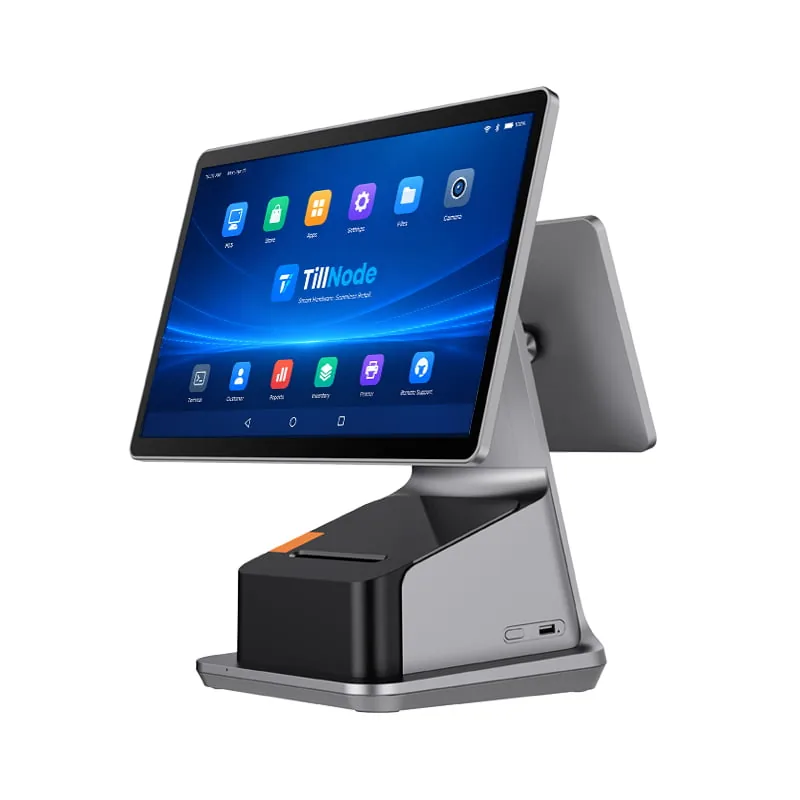
A touch screen cash register replaces the department keys with a display your staff taps. TillNode builds the hardware layer — a capacitive touch panel, an industrial mainboard, the printer and drawer ports, and the enclosure that holds them. The touch screen cash register system software comes from your ISV; the machine comes from us, configured to your market and shipped under your logo.
What Is a Touch Screen Cash Register?
A touch screen cash register is a checkout terminal whose operator interface is a display you tap rather than a grid of numeric and department keys. Inside the same enclosure sit the mainboard that runs the register application, the ports that drive a receipt printer and a cash drawer, and — on integrated models — the print mechanism itself. A cashier builds an order by tapping product tiles, then takes payment.
The term describes the interaction layer, not a single product. A touchscreen cash register can be a 10.1" panel on a food-truck counter or a 17.3" dual-screen unit in a supermarket lane. What they share is that the operator's hands never leave the glass.
The three names buyers use interchangeably are not the same thing. A touch screen cash register is the terminal. A POS system is the terminal plus printers, scanners, drawers and the software that binds them. A cash register in its older sense is a keyboard-and-drawer unit with no display-driven ordering at all.
Because TillNode manufactures the hardware layer only, every touch screen cash register machine we ship arrives ready to run whichever register application your software partner supplies — and we can re-label, re-house and re-configure every unit for your market before it leaves the line.
Why Counters Move to a Touch Interface
A keyboard register fixes the layout in metal: a new product category means a new key, a service visit and a printed overlay. A cash register touch screen moves that layout into software, which is why the same cash register touch screen chassis can serve a café in the morning and a bar at night. The three consequences below are what actually drive procurement.
01 / Layout
Menus Change Without Hardware
You re-arrange seasonal products, combo meals and price changes on the display. The counter keeps the same terminal through every menu cycle.
02 / Training
Fewer Keys to Memorize
New staff follow labeled tiles instead of a key map. Fewer mis-keyed amounts, and the training window shortens for seasonal hires.
03 / Data
The Terminal Becomes a Node
Because the interface is software, the same terminal reports to back-office inventory, loyalty and multi-store reporting without extra hardware.
Three Touch Screen Cash Register Form Factors
Choose by counter depth, cable tolerance and how much the customer should see.
Three architectures cover almost every counter we ship to. The difference is not screen size — it is where the mainboard sits, and how many cables you are willing to route. Pick the wrong one and the touchscreen cash register that looked cheapest on the quote becomes the one needing a new counter cut. The mainstream choice remains the all in one touch screen cash register, where the printer and cash-drawer driver live inside the same chassis; the dual screen touch screen cash register adds a customer-facing panel on top of that.
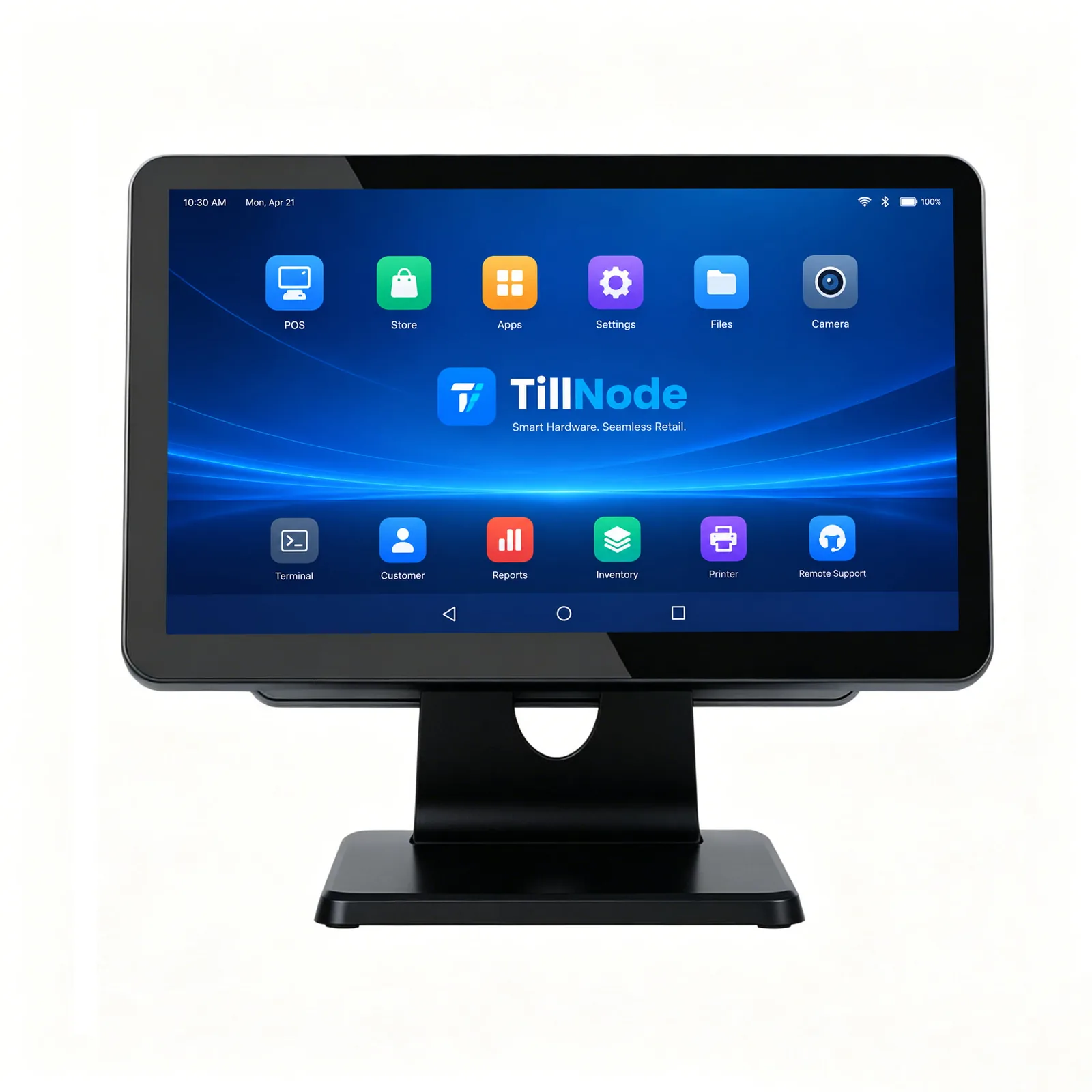
The Integrated Node
Screen, Mainboard and Printer in One Chassis
The mainstream touch screen cash register. One power lead, one service contact, no separate printer box on the counter. The receipt feeds from the base of the stand.
- DISPLAY 15.6" FHD PCAP, 10-point
- PRINTER 80mm thermal, built in
- PORTS USB ×4–6, RS232, RJ45
- FIT Convenience, café, QSR
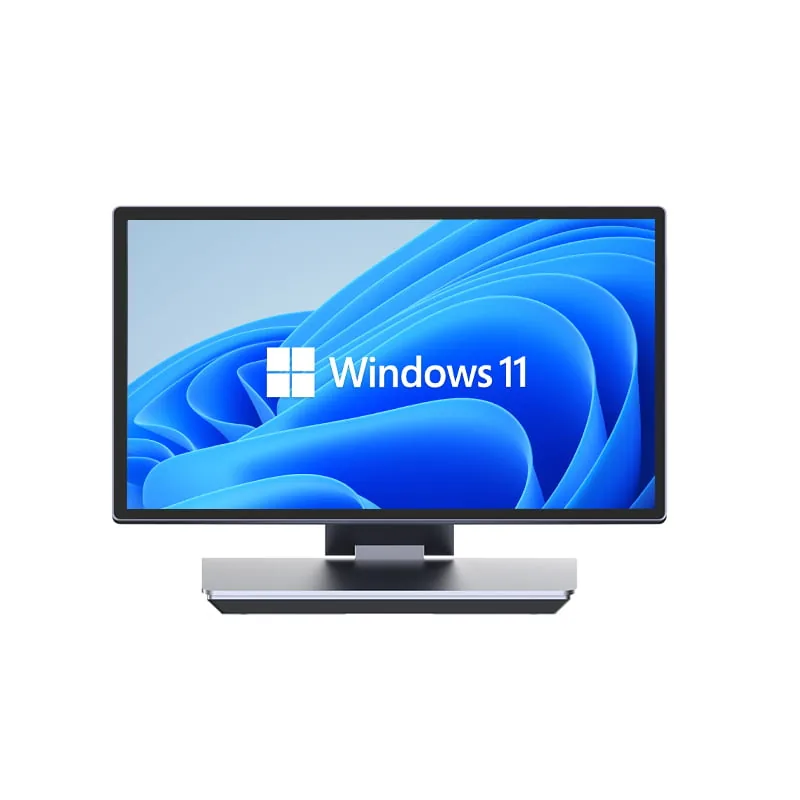
The Separated Node
Touch Panel, Mainboard Kept Off the Counter
The display sits on the counter; the mainboard lives in a fanless box below or inside the cabinet. Suits counters where heat, flour or grease would shorten the life of an integrated unit.
- DISPLAY 15.6"–17.3" touch monitor
- HOST Fanless industrial mini PC
- MOUNT VESA 75 / 100 bracket
- FIT Bakery, kitchen, workshop
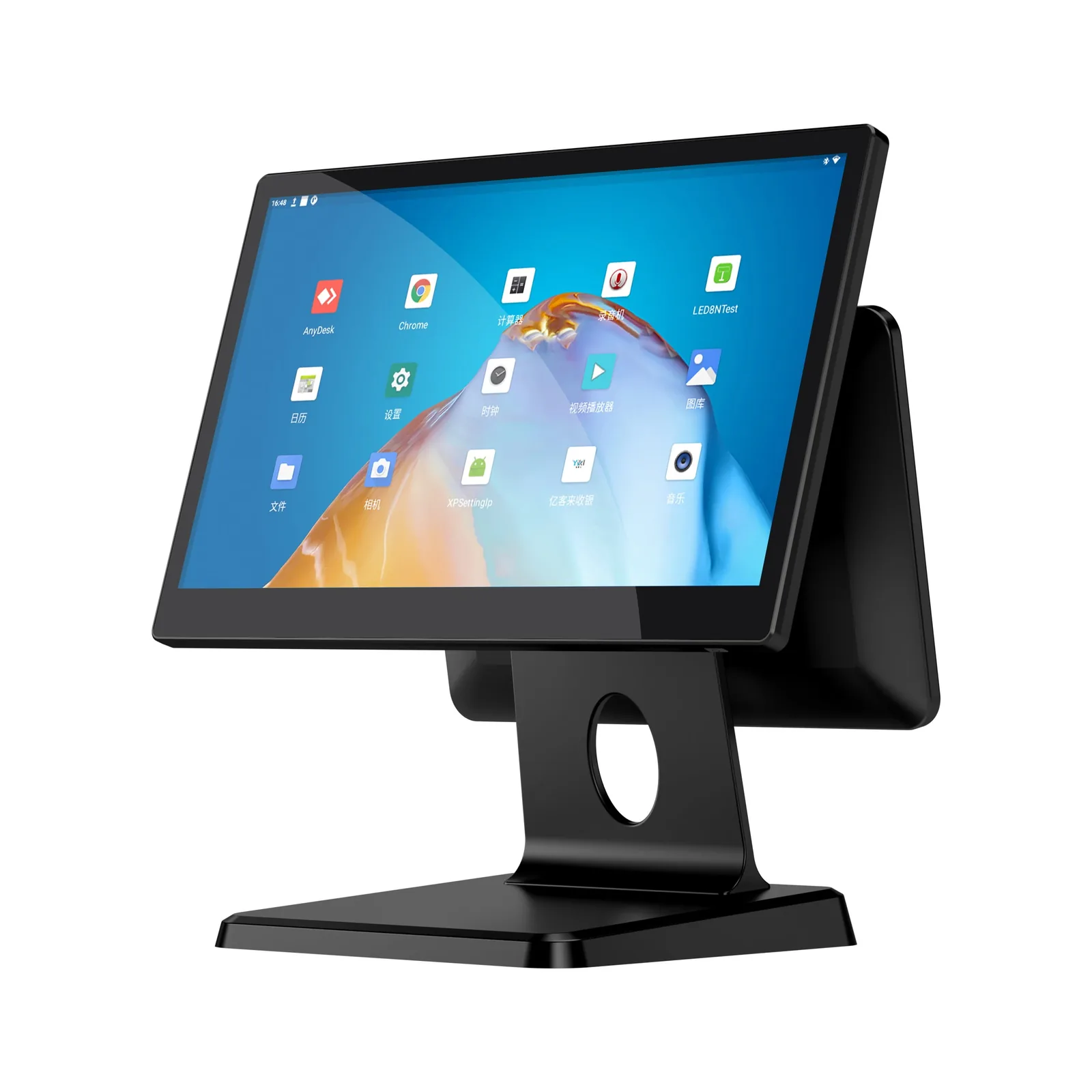
The Dual-Screen Node
Operator Panel Plus Customer Display
A second panel faces the customer for line-item confirmation, running totals and promotional loops. Common where billing transparency is part of the brand promise.
- MAIN 15.6" FHD PCAP touch
- SECOND 11.6" or 15.6" display
- VIDEO VGA / HDMI output
- FIT Supermarket, pharmacy, fashion
Capacitive or Resistive Touch
The single specification that decides most touch screen cash register returns is the touch technology. It is not a quality ranking; it is an environment match.
| Criterion | Capacitive (PCAP) | Resistive |
|---|---|---|
| Activation | Light finger tap | Physical pressure |
| Multi-touch | Yes, typically 10-point | Single point |
| With gloves or stylus | Depends on panel and glove | Works reliably |
| Surface | True-flat glass, zero-bezel options | Layered film surface |
| Typical environment | Retail counter, café, front of house | Kitchen, workshop, dusty or outdoor |
| Cleaning | Wipe-down glass | Wipe-down film, avoid sharp tools |
Specify the panel by the environment the counter actually runs in, not by the price difference between the two.
Screen Size Decides the Workflow
A cash register touch screen is a workspace, so its area sets how much of the product catalog a cashier can see at once. Four bands cover almost every deployment we build. Most inquiries we receive settle on a 15 inch touch screen POS panel for general counters or a 17 inch touch screen POS panel for high-volume lanes.
10.1" – 12.1"
Compact Counters
Food trucks, kiosks, deli counters and pop-up stations. A short menu fits on one screen without scrolling.
15.6"
General Retail & Restaurant
The default for a touch screen cash register for small business use: convenience stores, cafés, quick-service counters and independent retail. A 15.6 inch touch screen cash register panel is the size we build most often.
17.3"
High-Volume Lanes
Supermarkets, pharmacies and department stores where several categories stay visible and order lines run long.
DUAL PANEL
Customer-Facing Second Screen
An 11.6" or 15.6" panel turned outward for line-item confirmation, running totals and promotional content. This is the configuration behind most dual screen touch screen cash register requirements.
How to Specify Before You Buy
If you are searching for a cash register touch screen because the counter has outgrown its keys, the specification work starts well before a purchase order. Every touch screen cash register for sale is configurable, which means the quote you receive only matches your counter if the brief you sent described it. A touch screen cash register price and a cash register touch screen price quoted by two suppliers are only comparable once you fix the panel type, the CPU and the port set. Buyers who compare on the headline number alone are comparing three different machines.
A cash register with touch screen control is not automatically the right terminal for a very small fixed-price counter — there, a simple keypad still wins on cost. But for any counter that adds products, runs promotions or needs its sales to reach a back office, the touch form is the one that scales. Where the budget is genuinely tight, the honest answer is a smaller touch screen cash register panel in the 10.1" to 12.1" band rather than a cheaper mechanism that will wear out in a year.
Electronic touch screen cash register models and their touch screen electronic cash register equivalents describe the same class of machine — a display-driven terminal with an embedded mainboard. When a project brief uses a till cash register touch screen or a touch screen pos cash register phrasing, it is referring to this same hardware layer sitting on the counter. What changes between them is the configuration, not the category.
POS touch screen cash register system deployments differ from standalone lanes in exactly one respect that matters at procurement: you have to specify the terminal as part of a network. That is why touch screen point of sale cash register projects usually start with the software vendor's compatibility list, then work back to the panel, the CPU and the port count. Our team can build to that list rather than around it.
Three configuration choices account for most of the variation between quotes. First, the operating system: a Windows touch screen cash register suits sites that already run a desktop POS application, while an Android touch screen cash register suits lighter terminals and faster boot times. Second, the panel: a capacitive touch screen POS panel handles gloves-off, multi-finger operation, whereas a resistive panel suits gloved or wet environments. Third, the physical build — a countertop touch screen cash register terminal with a weighted touch screen cash register stand stays in alignment in a busy lane, and a fixed unit is easier to secure than a tablet left loose on the counter.
Where the terminal also prints, an integrated touch screen cash register with printer removes a separate box and its power lead; where it does not, the printer sits on a USB port beside the unit. A touch screen cash register with cash drawer follows the same logic — the register application drives the drawer over an RJ11 or serial connection, and you choose the bill and coin layout to the local currency rather than to the machine.
Deployment context narrows the shortlist further. A touch screen POS terminal in a café or quick-service counter differs in size from one at a supermarket lane, and a touch screen cash register system for restaurant use usually needs the highest tap speed and the most wipe-down surface of anything we build. When a brief asks for a touch screen cash register for restaurant counter that also handles takeaway and delivery tickets, the screen has to show more concurrent orders than a retail lane ever will. The same brief written as a touchscreen POS terminal requirement describes identical hardware — the wording varies by market, not by machine.
Touch Screen Register vs Traditional Keyboard Register
Buyers drawing up touch screen cash register system selection criteria usually start here. The comparison is not about which machine is better; it is about which constraint your operation is actually under.
| Dimension | Touch Screen Cash Register | Keyboard Cash Register |
|---|---|---|
| Product layout | Defined in software; re-arrange any time | Fixed to physical department keys |
| Adding a category | A settings change | A key overlay or a service visit |
| Order review | Full line-item list on the display | Paper tape or a small numeric panel |
| Catalog size | Thousands of SKUs across pages | Limited by the number of keys |
| Power and data | Runs a register application; reports to back office | Standalone arithmetic unit |
| Best fit | Retail and hospitality with a changing catalog | Very small fixed-price counters |
Where You Deploy Touch Screen Cash Registers
The same touch screen cash register system takes a different specification depending on the counter it lands on. These are the five deployments we build for most often.
Convenience & Small Format Retail
A touch screen cash register for small business use is normally the 15.6" integrated form: one unit covering ordering, receipt printing and drawer control on a counter with no room for a second box. A touch screen cash register with barcode scanner on the USB port handles the fast-moving lines.
Restaurants, Cafés & Bars
A restaurant touch screen cash register is usually capacitive and often dual-screen: order tiles for the operator, a customer panel for the running total. A touch screen cash register for restaurant counters that also serve a bar takes a spill-resistant true-flat panel. Where the venue runs a bar counter separately, a touch screen restaurant cash register and a bar touch screen cash register are typically the same model with different menu layouts — and a restaurant cash register touch screen in a kitchen-bound position usually takes the separated form, keeping the mainboard out of the hot zone.
Bars & Late-Night Venues
Bar counters prioritize speed under low light, so a touch screen cash registers for bars specification leans on a bright panel, large tap targets and a wipe-down surface. A touch screen cash registers for bars layout also puts the most-ordered drinks on the first screen rather than behind a category.
Supermarkets & Grocery
Large catalog plus high transaction counts push the lane to 17.3" and dual-screen. Scales and scanners sit on dedicated serial ports so they hold their connection through a full shift of touch screen cash registers running in parallel.
Small Format Retail & Independent Shops
A touch screen cash register for small business use and a touch screen cash registers for small business brief usually land on the same 15.6" integrated unit. Where a shop also wants the option to move the terminal, cash registers for small business touch screen projects sometimes pair the fixed counter unit with a tablet for the floor.
Fashion, Beauty & Specialty
A touch screen cash register for retail in a boutique setting suits counter presence as much as throughput: slim enclosure, aluminum stand, a customer-facing panel running brand content between transactions.
Pharmacy & Service Counters
Long item lists and a customer who needs to read the screen lead to 15.6" or 17.3" dual-screen. Where a touch screen cash register with scanner must also read prescriptions or loyalty codes, you specify a 2D imager on the same port set.
Multi-Lane & Multi-Site Rollouts
Rolling touch screen cash register systems — or several touch screen cash register systems deployed as one fleet — across several lanes or several stores adds two requirements the single-unit buyer never sees: identical configuration so spares are interchangeable, and a documented RMA path. Buyers comparing best touch screen cash register options for a chain are usually choosing a supply relationship, not a product. A touch screen cash registers for sale listing tells you the unit exists; only the configuration sheet tells you whether it fits lane 3 as well as lane 1.
The Port Set Decides What You Can Connect
A touch screen cash register is the center of a counter, not the whole counter — whether that is a single touchscreen cash register or a fleet of touch screen cash register systems across several sites. Before ordering, count how many peripherals must run at once: the port count, not the screen, is what most often forces a configuration change on a touch screen cash register machine.
58 / 80mm
Thermal Receipt Printer
Internal on the integrated form, or a USB model beside the terminal.
1D / 2D
Barcode Scanner
Handheld or fixed; a touch screen cash register with barcode scanner is the standard retail pairing.
RJ11 / RS232
Cash Drawer
The register application drives it; the bill and coin layout follows the local currency.
VFD / LED / LCD
Customer Display
A pole display or the second screen on the dual form.
PCAP / VESA
Touch Monitor
For the separated form, or to add a second touch surface at the counter.
MOBILE
Tablet Terminal
Where the cash register touch screen has to leave the counter for tableside or floor service.
For a full comparison of touch panel hardware, see our guide to POS touch screen monitors.
White-Label Touch Terminals for ISVs and Distributors
Most buyers of a touch screen cash register at volume are not end users — they are software vendors, distributors and system integrators who need the hardware to disappear behind their own brand. That is the configuration we build most.
If you are comparing a touch screen cash register supplier against a touch screen cash register manufacturer, the distinction matters more at volume than at unit one. A trading company can quote a touch screen cash register wholesale price; only the factory can change the panel, the port map or the enclosure. We build the units, so the specification is editable — and a touch screen cash register OEM project can start from your brand assets rather than from our catalog.
Identity
Logo on the enclosure, custom boot logo and OS image, branded packaging and labels.
Hardware Configuration
Screen size and panel type, CPU and memory, storage, I/O port layout, secondary display and enclosure color and finish.
Software Readiness
Windows, Android or Linux image, driver and SDK support, and pre-installation of your register application where the project requires it.
Commercial Terms
We confirm minimum order quantity, production lead time, warranty period and RMA process per order. Share your target quantity and configuration for a written quotation.
Touch Screen Cash Register FAQ
What is a touch screen cash register? >
Is a touch screen cash register the same as a POS system? >
Capacitive or resistive touch — which should I specify? >
What screen size do I need? >
How is it different from a traditional keyboard register? >
Can you supply it under our own brand? >
Which peripherals can run at the same time? >
What lead time applies to volume orders? >
Request Touch Screen Cash Register Pricing
Tell us the counter environment, the screen size you are planning for and the volume. We come back with the model configuration, the OEM options and pricing — not a generic brochure.