Two numbers decide whether a mount works, and neither of them is the number most buyers check. A VESA pattern of 75 x 75 or 100 x 100 is a hole spacing, four holes on a square, and it says nothing about how much the bracket can carry, how far the panel can reach from the wall, or whether there is room behind the plate for a cable. Getting the pattern right is the easy half. This page is about the other half, on a counter where the space is already spoken for.
Two numbers, and what they are not
VESA mounting is a mechanical interface, and the interface is deliberately minimal: a square of four threaded holes centerd on the back of the display. That is the whole promise. It guarantees that a bracket built to the same pattern will line up with the holes, and it guarantees nothing else.
| Pattern | What it fixes | What it leaves to you |
|---|---|---|
| 75 x 75 | Hole centers 75 mm apart, four holes, M4 thread | Load rating, arm length, depth behind the plate, wall substrate |
| 100 x 100 | Hole centers 100 mm apart, four holes, M4 thread | The same list, and whether the rear surface is flat enough to seat a plate |
Both patterns are common on point of sale hardware, and many brackets carry both sets of holes so either panel fits. The practical difference between them is area: a 100 x 100 plate spreads the same mass over a square 1.8 times the area of a 75 x 75 plate, which is why heavier panels and thinner mounting surfaces tend to use the larger pattern. That is a tendency, not a rule. The bracket's rated load is the number to read, and it is quoted separately from the pattern.
One measurement catches most ordering mistakes before they happen. Measure the diagonal between two opposite holes rather than the horizontal spacing, because a bracket that is close but not correct will usually fit three holes and fight the fourth. On a 75 x 75 pattern the diagonal is 106 mm and on 100 x 100 it is 141 mm. If the diagonal is neither, the rear surface is not a standard pattern, whatever the listing says.
The four ways a terminal ends up on a counter
Every mounting decision is really a decision about where the device sits relative to the person using it, and there are only four answers. Each one trades counter space against service access in a different way.
| Arrangement | Counter space used | Service access | Where it fits |
|---|---|---|---|
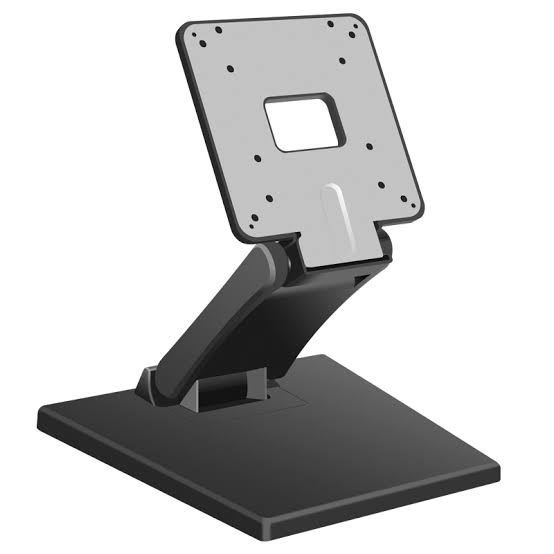
| Desktop stand | A base, typically a disc of 200 to 300 mm | Immediate; lift or tilt the unit | Fixed lanes where the cashier sits or stands in one spot |
| Pole and bracket | A clamp at the counter edge, or a grommet hole | Good; the head swivels toward the technician | Counters where the deck is needed for goods, not hardware |
| Wall bracket | None | Depends on the reach of the arm | Kitchens, back offices, anywhere the counter is shallow |
| Under-counter or behind-panel | None, but adds depth | Poor; the unit is out of sight by design | POS boxes and mini PCs, hidden from customers and staff |
Nothing in that table is decided by the VESA pattern. What decides it is the shape of the counter and the length of the shift. A stand wins when the operator can reach the unit without standing up and the deck has room. A pole wins when the deck does not, which is most kiosks and most small-format retail.
Counter space, measured in square centimeters
Space is the argument usually made for a pole mount, and it is worth putting a number on. A stand with a 250 mm circular base occupies 491 square centimeters of deck. A pole clamp of 120 by 80 mm occupies 96. The difference is about 395 square centimeters, which is roughly the footprint of a receipt printer or a card terminal.
That number is the honest version of the claim, and it comes with two caveats. The first is that a clamp needs an edge or a grommet: on a counter built into a cabinet, the edge may be the only place it can go, and that is where the customer leans. The second is that the deck area a stand occupies is not the whole cost. A stand also has to sit within arm's reach, and on a 600 mm deep counter that requirement pushes the goods to one side whether the stand is there or not.
The saving is real, it is just smaller than the marketing suggests. What the pole actually buys is not the 395 square centimeters. It is the ability to put the screen at a height and an angle that the deck cannot provide, and to keep the deck clear for the things a customer puts down.
The clearance nobody measures: rotation
A fixed panel needs clearance equal to its half width. A panel that swivels, tilts or rotates to portrait needs clearance equal to its half diagonal, because that is the path a corner sweeps. The difference is small enough to be ignored in a drawing and large enough to hit a lane divider.
Take a 15.6 inch 16:9 panel, the size used on most counter terminals. The glass measures 345 mm by 194 mm. Half the width is 173 mm and half the diagonal is 198 mm, so rotating it to portrait adds 25 mm of required clearance on each side. On a counter with a 20 mm gap to a divider, the panel will rotate into the divider and stop, and the natural conclusion is that the bracket is stiff.
Bigger panels behave the same way with a larger number. A 21.5 inch 16:9 panel measures 476 mm by 268 mm, so its half diagonal is 273 mm against a half width of 238 mm, and portrait rotation needs 35 mm more clearance on each side. If portrait is part of the plan, check the half diagonal rather than the width, and check the arm's swing in the same drawing, because a folded arm can bring a panel closer to the wall than the bracket's own dimensions suggest.
Height is arithmetic, not taste
Screen height follows from the operator's eye line, and the eye line follows from whether they stand or sit. A standing operator at a 900 mm counter looks at roughly 1,550 mm above the floor. A seated operator on a stool looks at roughly 1,200 mm. The center of the screen should sit 100 to 200 mm below that line, with the panel tilted down slightly so the surface faces the eye rather than the ceiling.
| Operator | Eye height | Screen center | Head height above a 900 mm deck |
|---|---|---|---|
| Standing | about 1,550 mm | 1,350 to 1,450 mm | 450 to 550 mm |
| Seated on a stool | about 1,200 mm | 1,000 to 1,100 mm | 100 to 200 mm |
The standing case is why pole mounts exist in kiosks: a 450 mm head height is not achievable with a desktop stand, and it is the difference between a customer reading the screen and a customer bending over it. The seated case is why so many counter terminals sit on a low stand instead: the same panel at 450 mm would be above the cashier's head all shift.
Two practical limits sit on top of the arithmetic. A pole that puts the head at 550 mm above the deck carries more moment than the same panel at 250 mm, so the clamp and the counter edge become the weak points rather than the bracket. And a screen tilted more than about 15 degrees starts to reflect ceiling lighting into the operator's eyes, which is why the tilt range on a bracket matters less than where the light is.
Load is a moment, not a mass
Brackets are sold on a weight rating, and weight is the wrong quantity to compare. What the bracket, the screws and the wall actually resist is the turning force the panel applies, and that force grows with distance from the fixing. A panel of 4.5 kg sitting 300 mm out from the wall produces 13.2 newton meters of moment. Move it to 600 mm and the same panel produces 26.4.
That number is what the wall feels. With the two top fixing screws 100 mm apart, a 13.2 newton meter moment becomes 132 newtons of pull-out shared between them, or 66 newtons each, before the vertical load is counted at all. A plasterboard plug rated for a picture frame does not do that job, and the crack that appears above the bracket is the wall telling you so before the panel falls.
Three consequences follow. Fix into a stud, a masonry wall or a structural member, and use a bracket whose arm can be folded back when the installation is finished. Include everything that hangs on the same head in the mass, because a mini PC strapped to the back of a panel is part of the load. And check the rating at the extension you will actually use, not at the extension the test was run at.
The 40 millimeters behind the plate
A VESA plate is flat, and the back of a compact terminal is not. Connector bays are recessed, power and LAN sockets sit inside a well, and the cable has to leave the socket and turn. That turn has a minimum radius, and the radius plus the plug body is the space the plate has to leave free.
In practice, a straight plug on a USB or DC barrel connector needs about 25 mm of bend radius, the plug body and the plate thickness add roughly 20 mm, and the result is that a gap under 45 mm behind the plate will either trap the cable or force the connector sideways in its socket, which is how ports crack. A right-angle adapter reduces the requirement to about half and is worth carrying as a stock item on any multi-site rollout.
The same measurement decides service access. If the plate and the arm cover the connector bay, every firmware update or cable swap means taking the panel off the wall. Mounting a panel is a five-minute job; unmounting one on a live counter is a fifteen-minute job with a queue in front of it.
What the range actually carries
The patterns are standard across the catalog, and the exceptions matter more than the rule because they are the ones that get ordered wrong.
| Product family | Interface | Pattern | Notes |
|---|---|---|---|
| Touch screen monitors | VESA on the rear chassis | 75 x 75 or 100 x 100 | Any commercial bracket or arm fits |
| Kitchen display systems | VESA integrated | 75 x 75 or 100 x 100 | Wall, ceiling or pole, no counter space |
| Modular POS box | VESA bracket | 75 x 75 or 100 x 100 | Under a desk, behind a monitor or inside a cabinet |
| Fanless mini PC | VESA mount included | VESA compatible | 136 x 126 x 39 mm, so it hides behind a 15.6 inch panel |
| Industrial panel PC | VESA or embedded panel | VESA compatible | 368 x 292 x 62 mm, cutout drawing supplied before any cutting |
| SN-P90 wall-mount build | VESA | 100 x 100 | A separate build in that family, not an accessory |
| SN-P90 standard and SN-P90P | None | Not applicable | Counter terminals with no VESA interface |
Two of those rows are the ones that cause trouble. A wall-mount build is a different unit rather than a bracket you add later, so it has to be specified in the order. And a terminal without a VESA interface cannot be put on an arm at all, whatever bracket is bought, because there is nothing on the housing to bolt a plate to. The stands and mounts range covers the brackets themselves, and the SN-P90 platform page sets out which build carries the interface.
The monitors are the simplest case, because the interface is moulded into the rear chassis: the touch screen monitor range carries 75 x 75 or 100 x 100 on every unit, and the point of sale monitor range states both patterns explicitly so a bracket can be ordered from the drawing. The panel PC is the opposite case: the AIO-157Y can be mounted on VESA or dropped into a cutout, and the cutout dimension is the one to settle first because it cannot be undone.
The mini PC figures are worth a second look because they explain a common installation. At 136 by 126 mm the SN-X30G sits inside the 345 by 194 mm rear face of a 15.6 inch panel with 105 mm of margin each side and 34 mm above and below, so a panel plus a hidden computer is a realistic arrangement rather than a tidy drawing. It adds 39 mm of depth and its own mass to the head, which is the moment argument again.
The five lines that belong in the RFQ
Mounting is the part of a rollout that gets specified last and installed first, and five lines prevent most of the surprises.
- Pattern, per device. 75 x 75, 100 x 100, both, or none, listed against the model rather than the family.
- What hangs on the head. Panel mass plus bracket plus any box or card reader sharing the mount, and the extension you will actually run.
- Clearance. The gap behind the plate, the rotation path if portrait is planned, and the distance to the nearest divider or wall.
- The fixing surface. Stud, masonry, cabinet panel or grommet, decided before the bracket is chosen rather than at the drill.
- Service access. Whether the connector bay stays reachable with the unit mounted, and who is allowed to unmount it.
One line belongs on the commercial side. Mounting hardware is cheap next to the terminal and it is the part most likely to be improvised on site from whatever the installer has in the van, which is how a correct panel ends up on an incorrect bracket. Supplying the bracket with the device, pre-fitted where possible, removes that variable. The modular POS box and the kitchen display systems are the clearest cases, because both are designed to be mounted out of the way and neither works well on a counter.
Frequently asked questions
Is 75 x 75 or 100 x 100 better?
Neither is better; both are hole spacings from the same mounting standard and a bracket that suits one usually offers the other as an alternative set of holes. The pattern has to match, and that is all it has to do. A 100 x 100 plate spreads the same load over a wider square, which matters on a heavy panel or on a weak wall, and a 75 x 75 plate fits small displays and compact terminals where the rear surface is not much bigger than the bracket.
Can I mount a POS terminal on a VESA arm?
Only if the terminal has a VESA interface on its rear or base. Many counter terminals do not: the housing is shaped for a stand, the rear is occupied by the printer or the cable bay, and there is nothing to bolt a plate to. In our range the touch monitors, the kitchen displays, the modular POS box and the panel PCs carry 75 x 75 or 100 x 100, the SN-P90 family has a separate wall-mount build at 100 x 100, and the standard SN-P90 and the SN-P90P printer build are counter units without one. Check the interface before ordering the arm, not after.
What screws does a VESA mount use?
M4 for the 75 x 75 and 100 x 100 patterns, with a length that equals the bracket thickness plus six to eight millimeters of engagement into the threaded insert. Too long is the common mistake: a screw that runs past the insert can bottom out against the housing or the panel, and the damage is invisible until the display develops a bright spot or stops powering on. If the rear surface is plastic rather than metal, the insert is usually a moulded boss, and over-tightening strips it.
How much weight can a 75 x 75 mount carry?
The hole spacing does not set a load rating. The bracket does, and the number that matters is not the mass but the moment: the rated load is quoted for the panel sitting close to the wall, so extending the arm turns the same mass into a larger twisting force on both the bracket and the fixings. A mount rated for the panel weight can still fail on a long arm, and a wall that holds a panel at 100 mm may not hold it at 300 mm.
How high should a counter screen be mounted?
Work back from the eye. A standing operator looks at roughly 1,550 mm above the floor and a seated operator at roughly 1,200 mm, and the center of the screen should sit 100 to 200 mm below that line with a slight downward tilt. On a 900 mm counter, a pole head about 250 mm above the deck puts the screen center at 1,150 mm, which is inside the standing band and the reason a pole mount and a low counter suit each other.
Do I need to find a stud to hang a screen?
For anything on a bracket, yes, or a masonry fixing of equivalent strength. The static weight is the small part of the load. A 4.5 kg panel on an arm extended 300 mm produces about 13 newton meters of moment, and with the fixing screws 100 mm apart the top pair has to resist roughly 132 newtons of pull-out between them, or 66 newtons each. That is well beyond what a plasterboard plug is rated for, and the failure appears as a crack in the wall long before the screen falls.