A buyer shortlisting an EPOS terminal and an Android POS terminal usually assumes they are choosing between two kinds of hardware. In this catalog they are often choosing between two boards fitted into the same cabinet. The 15.6-inch chassis that measures 375 x 215 x 330 mm appears here with a Windows board and with an Android board, with the same panel options, the same 12 V 5 A supply and the same cash drawer port. The photographs are accurate. The category names are what mislead.
What follows is the comparison that actually decides a lane: which sockets each board leaves you, how much power the finished unit draws, whether the receipt printer is inside the cabinet, and who is responsible for updating the operating system after the warranty period ends. There is also a third form factor that neither name covers, and for some sites it is the correct answer.
What buyers mean by "EPOS terminal"
The phrase arrived from a time when an electronic point of sale was a box under the counter driving a separate monitor. "EPOS terminal" meant the box. When the box and the monitor merged, the name stayed attached to the merged unit, and it now describes the fixed counter device in general: a flat panel, a board, a drawer port, usually a printer.
Nothing in that description mentions an operating system, which is why the same phrase covers Windows and Android units. If you are still working out how the two names relate to each other, the naming question is settled separately in how EPOS and POS differ in practice, and it does not need repeating here. The point for this page is narrower: "EPOS terminal" tells you the unit sits on a counter. It does not tell you what will run on it.
Android POS terminal does carry one piece of information, and it is a real one: the board is Android, so the software is an app. Everything else about the device is open, including whether it has the ports your lane needs.
Same chassis, two boards
Three models from this range, placed side by side on the specification rather than the picture:
| Line | SN-A12 (Android) | SN-C20 (Windows) | SN-F10 (Android) |
|---|---|---|---|
| Display | 15.6 inch, 1920 x 1080 FHD, 10-point capacitive | 15.6 inch, 1366 x 768 or 1920 x 1080 FHD optional | 15.6 inch, 1366 x 768 or 1920 x 1080 FHD optional |
| Cabinet | 375 x 215 x 330 mm | 375 x 215 x 330 mm | 375 x 215 x 330 mm |
| Supply | 12 V DC, 5 A, 100-240 V input | 12 V DC, 5 A, 100-240 V input | 12 V DC, 5 A, 110-220 V input |
| USB | 4 x USB 2.0 / 3.0 | 4 x USB 3.0 plus 2 x USB 2.0 | 6 x USB 2.0 / 3.0 |
| Serial | None listed | 1 x RS232, configurable up to 3 | 1 x RS232, configurable up to 3 |
| Drawer port | 1 x RJ11, 12 V / 24 V, optional | 1 x RJ11, 12 V / 24 V, optional | 1 x RJ11, 12 V / 24 V, optional |
| Customer display | 11.6 or 15.6 inch LCD, or VFD | 11.6 or 15.6 inch LCD, or VFD | 11.6 or 15.6 inch LCD, or VFD |
Two of these three run Android and one runs Windows, and the cabinet, the supply and the drawer port are identical across all three. If you shortlisted on the datasheet photograph you would learn nothing that separates them. The separation is in two rows: the serial port and the USB count. Both models sit in the all-in-one POS terminal range at the same cabinet size, and the listing does not tell you which box holds which board.
One caution about generalizing this. Chassis sharing between platforms is common because it is cheaper to build one enclosure and two boards, but it is not universal, and a supplier who shows you an Android unit in a different body is not doing anything wrong. The way to check is arithmetic: put the three dimensions of the SN-C20 beside those of the SN-A12. Identical figures across two platforms is near-proof of a shared cabinet. Different figures tell you the answer to a different question, which is that you are comparing two designs.
Where the boards actually diverge
Six lines separate a Windows board from an Android board at a counter. None of them are about the screen.
| Decision line | Windows board | Android board | What to ask |
|---|---|---|---|
| Where the software comes from | Installed by the reseller or the integrator, one lane at a time | Installed as an app, distributable to every lane at once | Is there a signed build for the deployment method you use? |
| Peripheral drivers | Vendor drivers exist for almost every printer and scanner made | Drivers must exist inside the app; a printer with no Android SDK will not print | List every peripheral by model and ask for the Android SDK, not just the port |
| Who patches the OS | You, or whoever owns the estate | The supplier ships firmware; the app vendor ships the app | How long after purchase will firmware updates be issued, in writing |
| Recovery after a disk failure | Reimage from your own build | Reflash from a supplier image, or restore from the app layer | Is a recovery image supplied with the unit |
| Remote management | Standard desktop tools, if you already run them | App-level or MDM-style, depends on the supplier | Can the unit be updated without a site visit |
| Hardware life | Board and storage are replaceable parts in most designs | Board is sealed to the panel more often; treat as a whole-unit replacement | What is the spare-part path at year three |
The two rows that eliminate candidates fastest are the first and the second. Software availability is a hard gate: if your point of sale application is Windows-only and no Android build exists, the Android terminal is out of the running before price is mentioned. Peripheral drivers are the softer version of the same gate, because it is common for a lane to be quoted a printer whose Android SDK does not exist, and the problem only appears on installation day.
The OS patch question is the one buyers most often leave open, and the one that costs the most later. It is not answerable from a category page. Ask the supplier to state, in the quotation, how many years of firmware updates the model will receive and what happens after that. An answer of "we support our products" is not an answer.
The socket tally is the spec that bites
The port list is where Android and Windows models in the same cabinet stop being interchangeable, and it is easy to read past because the rows look similar. Four models, from this range:
| Model | Board | Serial | USB | Legacy video |
|---|---|---|---|---|
| SN-B10 | Windows | 2 x RS232, fixed | 6 | 1 x VGA |
| SN-C20 | Windows | 1 x RS232, configurable up to 3 | 6 (4 x 3.0 plus 2 x 2.0) | 1 x VGA |
| SN-A10 | Android | 1 x RS232, configurable up to 3 | 4 | 1 x VGA |
| SN-A15 | Android | None | 4 | None |
Two different things are visible in that table, and both change a purchase. The first is that "configurable up to 3" is a build option, not a standard feature: the unit arrives with one port unless you wrote three into the order, and it cannot be added afterward because the connector positions are cut at assembly. The second is that the SN-A15 carries no serial port at all. It is a 15.6-inch Android terminal in the same family as the SN-A10, and on a lane with a serial scale it does not fit, which is a fact you would not guess from the product name.
The practical sequence is to count serial devices first. A weighing scale, a kitchen printer on serial input and a PIN pad is three, and only some models can reach three. USB is more forgiving because hubs work, but count those too: a terminal with four USB ports carrying a scanner, a printer, a customer display and a card reader has no spare port, and the fifth device is the one that forces a hub onto the counter.
What a built-in printer does to the power budget
Adding a printer to the cabinet is the single most consequential line in an all-in-one specification, and it changes the electrical requirement as well as the counter layout. Same 15.6-inch panel, two models:
| Line | SN-C20 (no printer) | SN-W50 (built-in printer) |
|---|---|---|
| Supply | 12 V DC, 5 A | 12 V DC, 7 A |
| USB | 4 x USB 3.0 plus 2 x USB 2.0 | 6 x USB 2.0 / 3.0 |
| Cabinet | 375 x 215 x 330 mm | 34 x 23 x 44 cm |
| Printer | None | Direct thermal, 58 mm or 80 mm paper, 160 mm/s, auto-cutter with partial and full cut |
Seven amps against five is a 40 percent increase in supply capacity, and it is not a rounding difference at the socket: a lane that was sized for a 5 A brick and a shared power strip needs to be sized again, and a counter running four lanes on one circuit should check the total before the units arrive. The cabinet also grows by roughly 10 cm in depth, which matters where the terminal sits under a shelf.
Paper width is the line most often left to the supplier, and it decides the receipt. A 58 mm roll gives about 48 mm of printable width, which is around 32 characters at the usual font, and that forces an item line and its price onto separate rows on anything longer than a short product name. An 80 mm roll gives about 72 mm and roughly 48 characters, enough to keep the two on one line. Both are available in the same model, configurable at order.
There is also a real difference between small and large format units that is easy to miss. The compact 10.1-inch terminal with a built-in printer prints on 58 mm paper only, at 90 mm/s, with no auto-cutter. A 15.6-inch model with the same feature prints 58 or 80 mm at 160 mm/s with a cutter. If the receipt has to be torn by hand at a busy counter, that is the difference between a queue that moves and one that does not.
The third form factor neither name covers
An EPOS terminal and an Android POS terminal are both fixed. A counter unit does not leave the counter. For a growing share of retail and hospitality work that is the wrong shape, and the range that covers it is the tablet: 8.4 inches to 12.1 inches, Android 13 or 14, and a dock that supplies power and wired ports.
| Model | Screen | Memory | Platform | Battery |
|---|---|---|---|---|
| SN-N84 | 8.4 inch, 1920 x 1200 FHD Incell | 3 GB + 64 GB, customizable | Android 13, octa-core up to 2.0 GHz | Dock-charged |
| SN-U101 | 10.1 inch, 800 x 1280 | 4 GB + 64 GB, customizable | Android | Dock-charged |
| SN-R18 | 10.36 inch, 1200 x 1920 IPS | Per build | Android | Dock-charged, 360 degree base |
| SN-U1095 | 10.95 inch, 1200 x 1920 FHD Incell | Per build | Android, camera-free | 6,000 mAh internal |
| SN-N120 | 12.1 inch, 1600 x 2560 | 8 GB + 128 GB, customizable | Android 14, octa-core up to 2.2 GHz | 10,000 mAh internal |
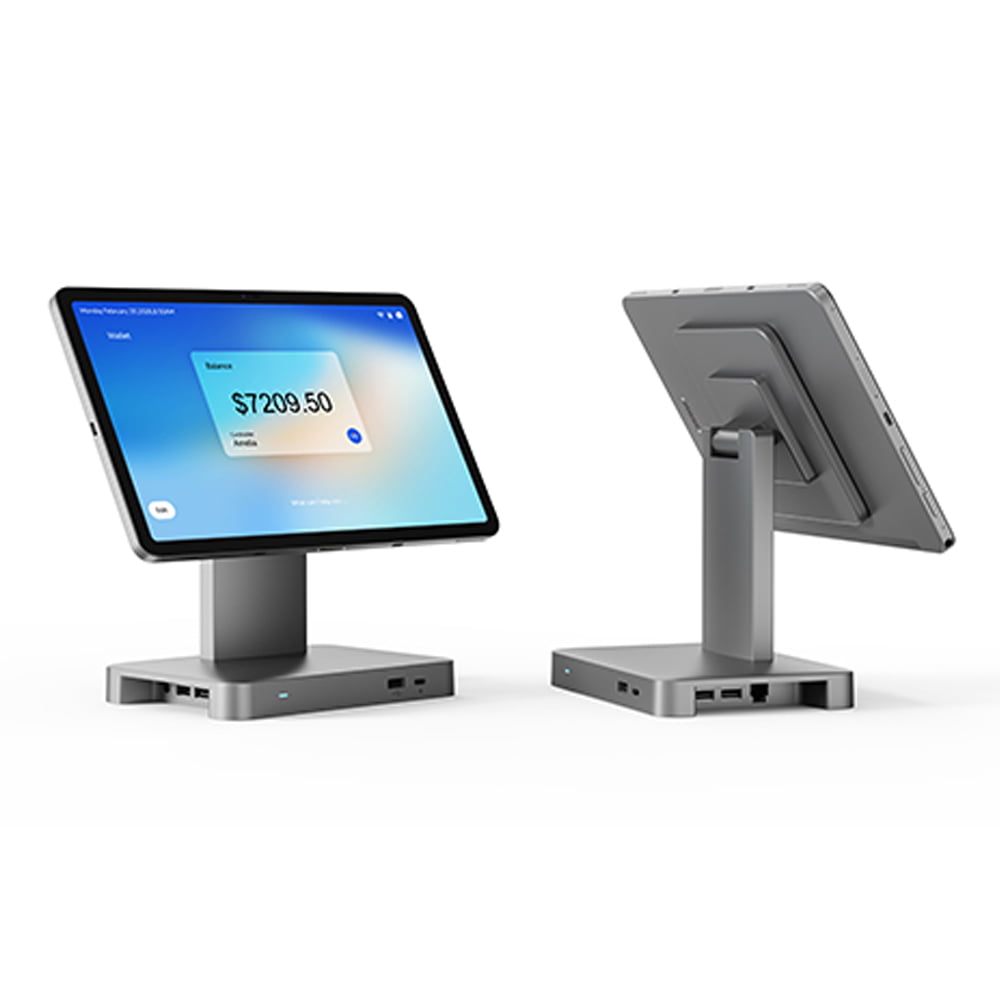
The dock is what makes the form factor work, because it is what turns a tablet into something with a counter's worth of ports. The expansion base in this range adds two USB ports and an RJ45 Ethernet port on top of magnetic charging, which covers a scanner, a printer and a wired network. A heavy-duty base carries a 20,000 mAh pack with PD 30 W input, which is the version for pop-ups and sites with unstable power. A 360-degree rotating mount lets staff turn the screen to the customer for confirmation and turn it back to key in the next item, without lifting the device.
That rotation is not a gimmick. It removes the second screen. A fixed terminal facing the operator needs a customer display beside it, and the customer display is another part to specify, power and fail. A tablet on a rotating base does the same job with the hardware you already bought, which is why tableside ordering and counter-service formats have moved this way.
Where the tablet is the wrong answer is equally specific. A single fixed lane with a cash drawer and a receipt printer is better served by a terminal: the docked tablet costs more per position once the base is counted, the drawer port has to come from somewhere, and the battery is the component most likely to fail first in a device that never moves. Mobility that nobody uses is a cost, not a feature. The smart POS tablet range and its mounting system covers the deployments where the screen genuinely travels.
Four questions that decide it
Work through these in order. Each one eliminates options, and the first one usually eliminates the most.
- Does your software run on the board? A Windows-only application eliminates every Android unit regardless of price or specification. Conversely, a web-based or app-based point of sale removes the reason to pay for a Windows board at all.
- How many serial devices are on the lane? Zero makes the whole range available. One narrows it slightly. Three narrows it to the models that can be configured to three ports, and that configuration has to be in the order.
- Is the receipt printed at the point of sale? If yes, specify a built-in printer and accept 12 V 7 A and the deeper cabinet. If no, a separate printer buys serviceability and a smaller terminal.
- Does the screen stay on the counter? If it lifts off during service, the answer is a tablet on a dock and the fixed terminals are the wrong category. If it never moves, the fixed terminal is cheaper and has fewer parts to fail.
One number worth carrying into all four: units in this range draw either 5 A or 7 A at 12 V DC, and the difference is the printer. Whatever you choose, the site's power plan should be written against the larger of the two.
What changes in the RFQ either way
The form factor decision does not remove the pricing variables, it adds two of them. An enquiry for this category should carry the board, because the board decides the software, and the serial port count as a number rather than an adjective. Everything else on the commercial side is the same list as any counter hardware purchase: quantity, the connectors you need populated, the certificates for the target market by model, the packaging standard, the spare-parts allowance and the Incoterm with a named port.
The POS hardware RFQ template sets out the eight lines that move a price, with a version you can paste into an email. Commercial terms, sample treatment and lead time by what is changing are on the ordering terms page.
If the shortlist comes down to two units that differ only in the board, ask both suppliers the same question and compare the answers word for word: which peripherals do you have an Android SDK for, and how many years of firmware updates will this model receive. The answers will separate them faster than any datasheet.
Frequently asked questions
Is an EPOS terminal the same thing as an Android POS terminal?
Not the same, and not different in the way the two names suggest. Both describe a flat-panel unit at the counter with a board inside, a cash drawer port and usually a receipt printer. The useful distinction is the board, not the name: a Windows board runs the software your reseller installs, an Android board runs an app built for the platform. In this catalog the same chassis appears under both names, so the cabinet does not tell you which one you are being quoted.
Can I run my existing Windows POS software on an Android terminal?
No, unless the vendor ships an Android build of it. The two platforms take different binaries. If your software is Windows-only and the vendor has no Android edition, an Android terminal is not a candidate however good the price is. Check this before you compare hardware, because it eliminates options faster than any specification line.
Why do the Android and Windows models look identical in the photographs?
Because in several cases they are the same enclosure built around a different mainboard. The 15.6-inch chassis that measures 375 x 215 x 330 mm appears in this range with both an Android board and a Windows board, with the same panel options and the same 12 V 5 A supply. The photographs are honest; the comparison you have to make is on the specification table, not on the image.
Do I need a serial port?
If you connect a weighing scale, a kitchen printer that takes serial input, or an older PIN pad, yes. Serial ports are the first thing an all-in-one drops when the board changes, and there is no adapter that restores a full RS232 interface reliably over USB for every device. Count the serial devices on the lane before you shortlist, then check each model individually: some models in this range offer no RS232 at all, and some offer one that can be configured up to three at the time of the build.
Should I choose a terminal with a built-in printer?
It shortens the counter and removes one cable and one power outlet, and it costs about 40 percent more power draw on the same 15.6-inch chassis: 12 V 7 A instead of 12 V 5 A. If receipts are printed at the point of sale, the built-in unit is usually the right answer. If the lane sends orders to a kitchen printer and only prints a customer copy at the end, a separate printer placed out of the way is easier to service and to replace.
When is a POS tablet the better choice than a fixed terminal?
When the person taking the order is not standing still. Tableside ordering, queue busting and any format where the screen has to face the customer repeatedly all favor a tablet on a dock: the screen rotates, the device lifts off, and the battery carries it across a service period. For a single fixed lane with a drawer and a printer, a docked tablet costs more per position and adds a battery that will eventually be the first thing to fail.